Take a look at the email below. I received it Oct 30 at 2pm.
Does anything stand out as odd?
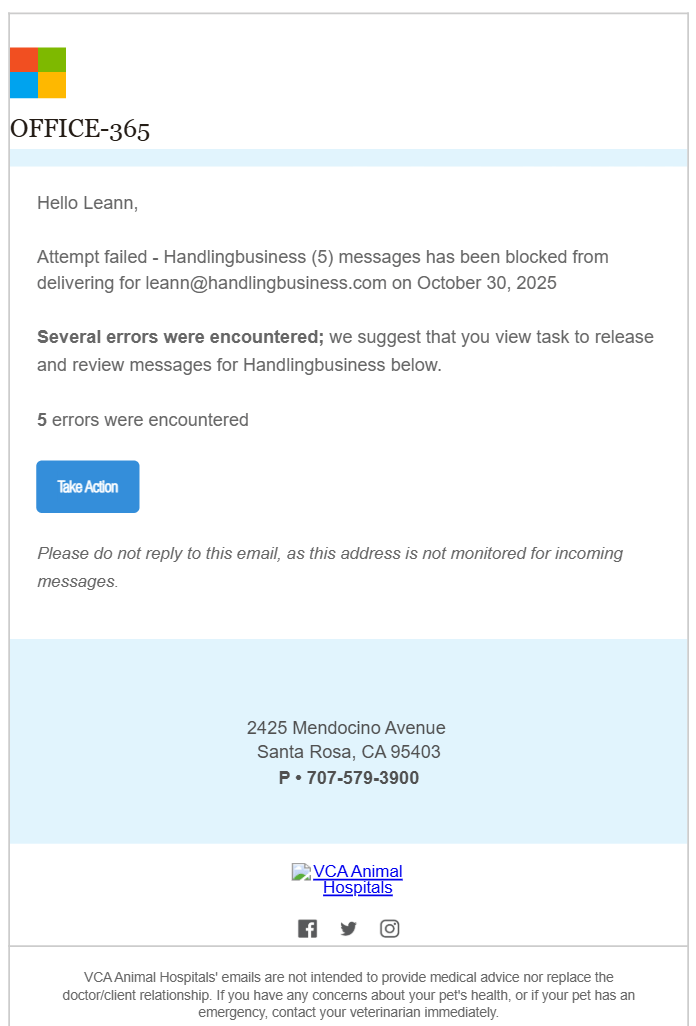
Here’s what I notice . . .
- The font and color for Office 365 is wrong
- The Microsoft logo boxes shouldn’t be touching each other
- There isn’t a reason for the Microsoft or Office logo to be on this email
- It claims that 5 messages were blocked on Oct 30, but I received just this one email at 2pm on Oct 30. If it was a summary email I would expect to get it on the 31th.
- After hovering (not clicking) on the Take Action button it links to Pawan Eye Hospital in India.
- The address listed is in Santa Rosa. I don’t live near Santa Rosa
- All of the links in the footer are real and belong to VCA Animal Hospital
On first glance only the Office-365 caught my eye, that was enough to make me pause and wonder if it’s real or not. On examination, it’s clear that it is a scam or phishing.
Here’s a quick list of what to check when you receive an odd email:
- From address (whose name AND the email address)
- To address (whose name AND the email address)
- Logos and fonts
- Grammar and punctuation
- Links going to correct location (check by hovering over the link and reading the URL)
- MOST IMPORTANT: Do a “gut check”. If something seems off to you about the email, you are probably right.